
Free AIA G702-Style Pay Application
The fillable G702-style pay application — right on this page!
The application for payment contractors know as G702, with its G703-style continuation sheet — same lines 1–9, same columns, same retainage math. Fill it out below and download the finished application free as a PDF or Excel workbook. Not an official AIA form, and no signup.
G702 is the AIA's application-for-payment cover sheet — nine numbered lines that walk from the original contract sum down to the current payment due — and G703 is the continuation sheet behind it, itemizing the schedule of values line by line. The form above produces the same two-page structure: enter your schedule of values and this period's work, and every G702 line and G703 column is computed for you, checked for the reconciliation errors reviewers bounce applications for.
The official forms are copyrighted AIA documents, so what you download here is an original, G702-style layout — the same information in the same order, which is what most private subcontracts actually require. Where a contract strictly names the official documents, purchase them from AIA Contract Documents.
Because this is G702/G703-style software rather than a static file, the fillable form does what a fillable PDF or spreadsheet can't: it validates the math as you type, warns about the reconciliation errors reviewers bounce applications for, and rolls each application forward into the next period's.
A reviewer used to the AIA cover sheet finds every figure on the line they expect — the nine G702 lines map one-to-one to the application summary above:
| On G702 | On this form |
|---|---|
| 1. Original contract sum | Original contract amount |
| 2. Net change by change orders | Net total of change orders |
| 3. Contract sum to date | Current contract amount |
| 4. Total completed & stored to date | Work completed & stored to date |
| 5a / 5b. Retainage — completed work / stored materials | Retainage on completed work and stored materials |
| 6. Total earned less retainage | Earned to date, less retainage |
| 7. Less previous certificates for payment | Less amounts from previous applications |
| 8. Current payment due | Amount due this application |
| 9. Balance to finish, including retainage | Remaining balance, including retainage |
How it works
- 1Enter your schedule of valuesThe G703 side of the document: break the contract into line items — or import them from a spreadsheet — with scheduled value, previous applications, and retainage rates.
- 2Bill this period's workEnter what each line completed this period plus stored materials and change orders. Columns D through I of the continuation sheet — totals, percent complete, balance, retainage — fill themselves in.
- 3Download it as a PDF or Excel workbookA G702-style cover application with lines 1–9 and certifications, backed by the itemized continuation sheet. Next month, one click rolls this application forward.
Prefer to fill it in by hand? Download a blank pay application template (PDF & Excel) with the same layout and up to 20 line items.
What's calculated for you
- ✓Lines 1–9 of the cover application, from contract sum to current payment due
- ✓Retainage on completed work and stored materials (lines 5a and 5b), at your rates
- ✓Every G703-style column: completed and stored to date, percent complete, balance to finish, and retainage per line
- ✓The roll-forward between applications — this period moves into previous applications, and the application number increments
- ✓Reconciliation checks before download, so the schedule ties to the contract sum the way reviewers verify it
What the finished document looks like
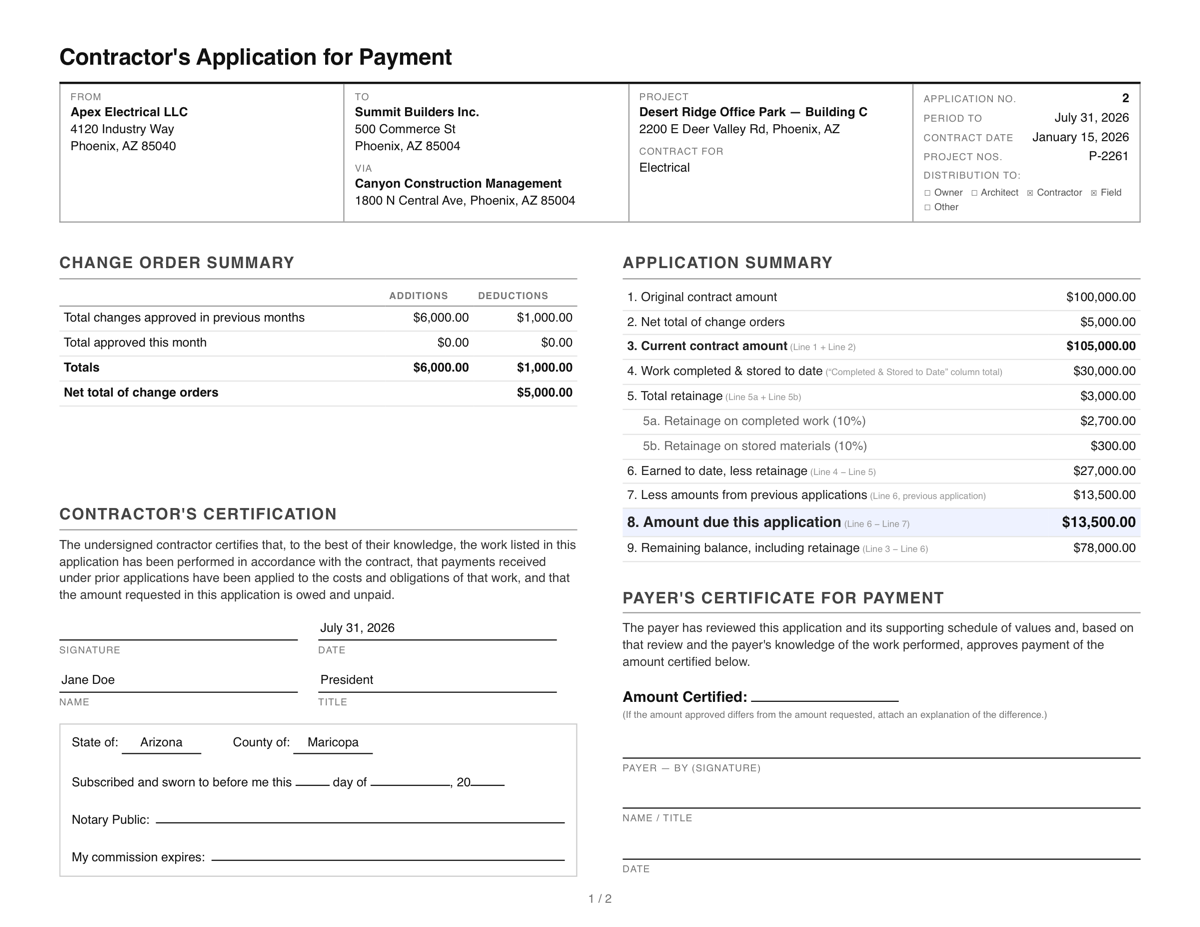
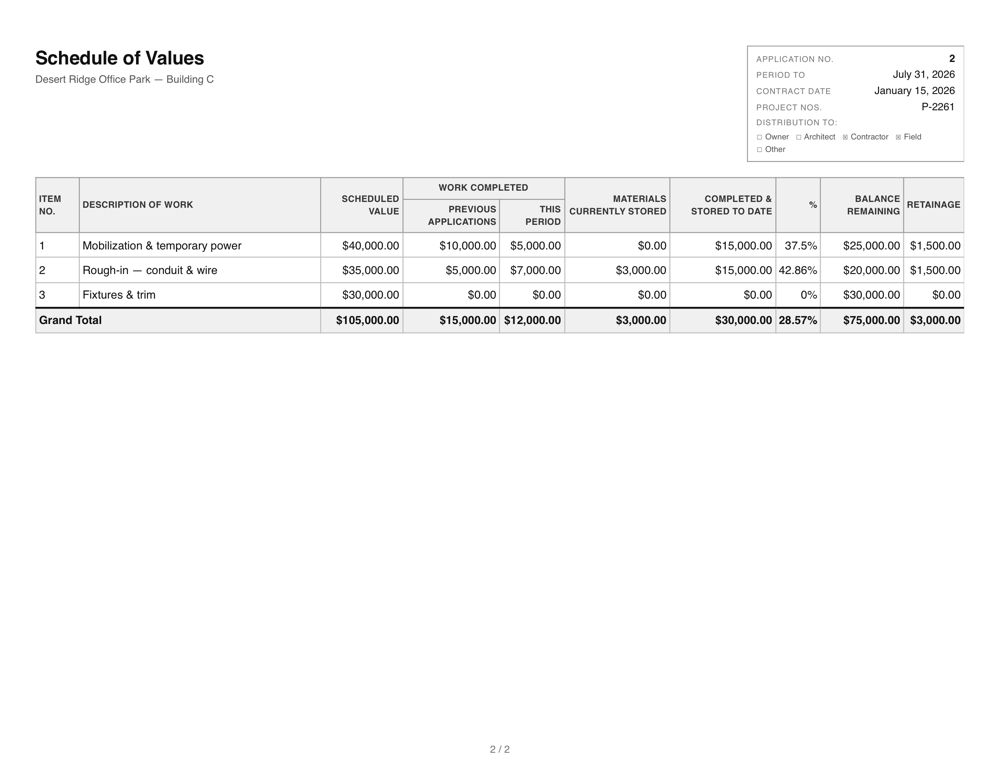
The cover application and the itemized continuation sheet with your full schedule of values. View the full sample PDF.
Why “G702-style” and not G702
G702® and G703® are copyrighted documents of the American Institute of Architects, sold through AIA Contract Documents. This site is not affiliated with the AIA and doesn't reproduce their forms — it produces an original layout carrying the same information in the same order. Free “official AIA downloads” found elsewhere are usually unlicensed copies or fragile spreadsheet recreations; if your contract requires official, buy official.
Prefer spreadsheets? Export your completed application as a G702/G703-style Excel workbook.
Start with the guides
- G702 vs G703: what each form does and how they work together
- How to fill out a pay application, step by step
- What is retainage? How it works and how to calculate it
Frequently Asked Questions
- Is this the official AIA G702 form?
- No. G702 and G703 are copyrighted AIA documents, so this is an original, G702-style layout: the same lines 1 through 9 on the cover, the same continuation-sheet columns, and the same math. If your contract strictly requires the official AIA documents, purchase them from AIA Contract Documents.
- Will a general contractor accept a G702-style form?
- On most private subcontracts, yes — what payers check is that the schedule of values ties to the contract sum, retainage is applied correctly, and the amount due reconciles against previous applications. Those figures appear here on the same lines a reviewer looks for them on a G702. When a contract names the official AIA forms specifically, use those instead.
- Is it really free?
- Yes — filling out the form and downloading the PDF or Excel workbook are free with no account. You accept the site's terms of use before downloading.
- Does it include the G703-style continuation sheet?
- Yes. Every download is two pages: the cover application with the summary lines and certifications, and an itemized continuation sheet listing each schedule-of-values line with work completed, stored materials, percent complete, balance, and retainage — the same columns G703 carries.
- Is there a free fillable G702 form?
- The official G702 is sold by AIA Contract Documents — free “fillable G702 PDFs” floating around are unlicensed copies. This page is the legitimate route: a fillable, G702-style form you complete online, with every line calculated for you and the finished application downloaded as a PDF or Excel workbook.
- Is this G702/G703 software or a template?
- Software — a free web application rather than a file you maintain. Unlike a template, it computes lines 1–9 and every continuation-sheet column live, checks that the schedule ties to the contract sum, and handles the roll-forward between billing periods. No install, no signup.
- What happens on next month's application?
- One click rolls the application forward: this period's amounts move into the previous-applications column, the application number increments, and your history keeps each period — the continuation workflow the paper forms make you redo by hand. See the step-by-step guide.