
Free Pay Application Generator for Contractors
Create professional construction pay applications in one click!
Bill for construction work as you complete it. Enter your schedule of values, record what was finished this period, and download a professional pay application — retainage, totals, and the payment due are calculated for you.
Create a professional construction application for payment — the G702/G703-style pay app package — in minutes. Enter your schedule of values, bill the work completed this period, and download a ready-to-submit PDF or Excel workbook with a cover application and continuation sheet. Retainage, percent complete, balance to finish, and current payment due are calculated automatically.
This is the document that requests a progress payment: rather than one invoice at the end of the job, you bill each period for the share of the contract you have actually completed, and the payer certifies it against the same schedule every month.
How it works
- 1Enter your schedule of valuesList your contract's line items — or import them from a spreadsheet — along with your contract sum and retainage rates. The schedule of values frames every application on the project.
- 2Bill the work completed this periodEnter a dollar amount or percent complete for each line, plus materials stored on site and any approved change orders. Previous applications carry forward automatically month to month.
- 3Download your pay application — PDF or ExcelGet a complete package — cover application and itemized continuation sheet — ready to sign and submit to your customer.
Prefer to fill it in by hand? Download a blank pay application template (PDF & Excel) with the same layout and up to 20 line items.
What's calculated for you
- ✓Retainage on completed work and stored materials, at your contract's rates
- ✓Total completed and stored to date, per line and for the contract
- ✓Percent complete and balance to finish on every line item
- ✓Net change orders and the current contract sum
- ✓Amounts from previous applications, deducted automatically
- ✓Current payment due — the number your customer certifies
What the finished document looks like
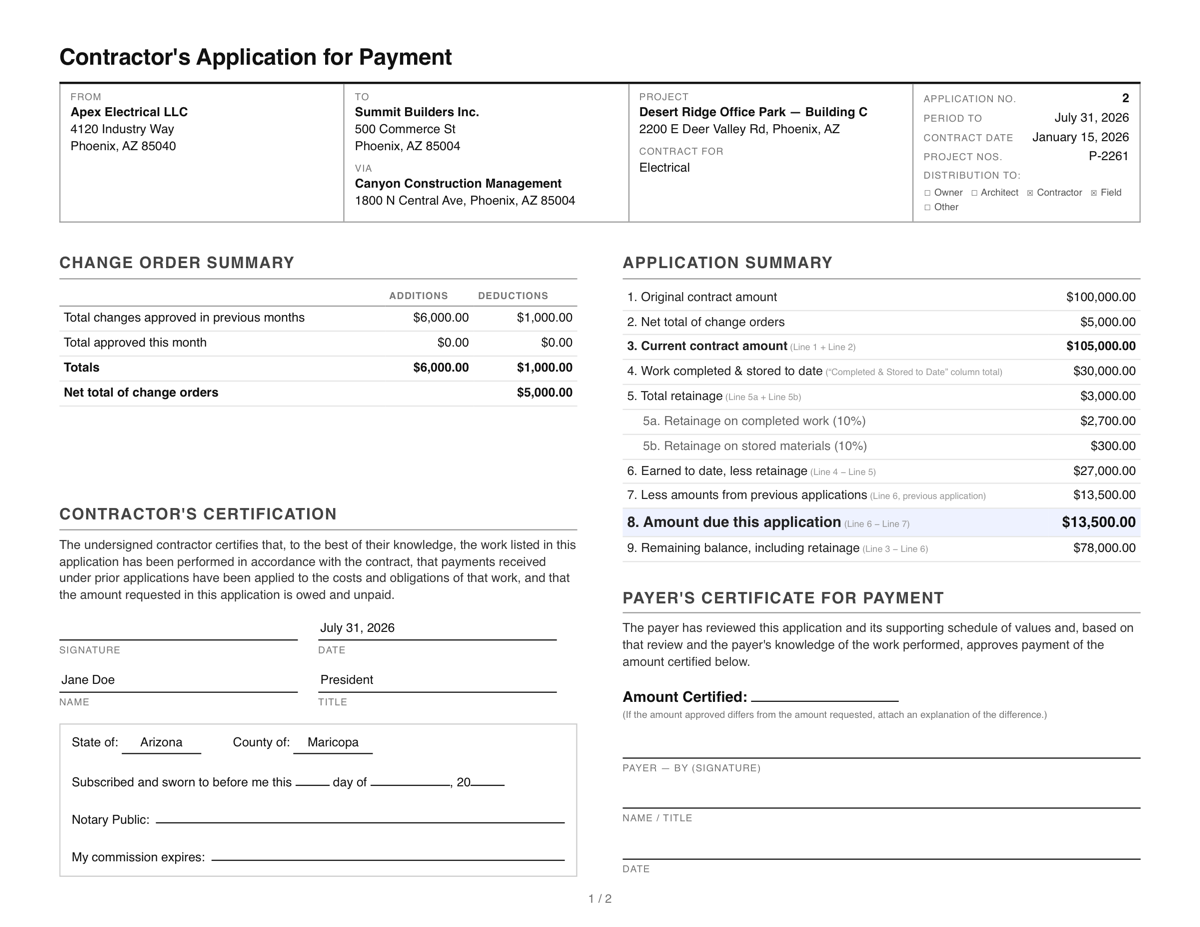
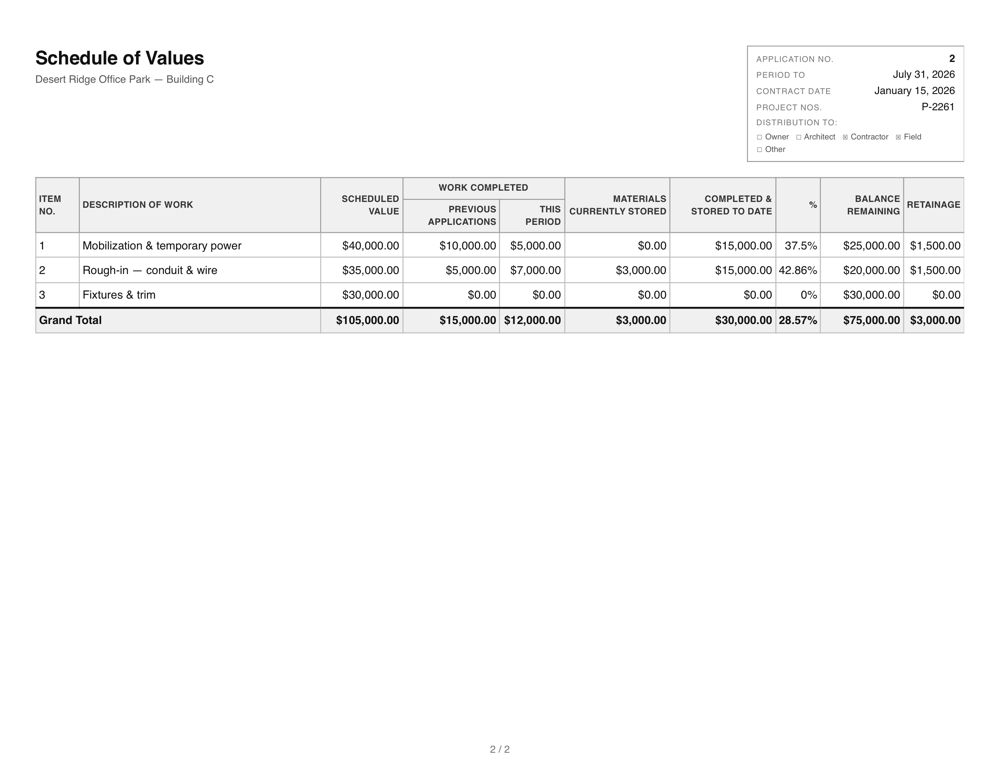
The cover application and the itemized continuation sheet with your full schedule of values. View the full sample PDF.
An alternative to AIA G702 and G703 forms
This generator produces an application for payment and continuation sheet that capture the same information and calculations contractors use the G702 and G703 forms for — contract sum, schedule of values, retainage, and current payment due — in an original layout. It is not affiliated with the AIA, and if your contract strictly requires official AIA documents, purchase them from AIA Contract Documents.
For most private subcontracts, what matters is that the math reconciles and the document is complete: the schedule of values ties to the contract sum, this period's billing rolls forward from the last application, and retainage is applied consistently. Every download here does that arithmetic for you.
See the free AIA G702-style pay application template, with a line-by-line map of both forms.
Start with the guides
- How to fill out a pay application, line by line
- What retainage is and how it's calculated
- How to create a schedule of values
- Why pay applications get rejected — and how to avoid it
Frequently Asked Questions
- What is a construction pay application?
- A pay application (pay app) is the standard package a contractor submits to request a progress payment. It summarizes the contract sum, work completed to date, stored materials, retainage withheld, previous payments, and the amount currently due — backed by a line-by-line continuation sheet based on the schedule of values.
- What is a progress payment in construction?
- A progress payment is a partial payment for work completed so far, rather than one payment at the end of the job. You bill for the share of the contract that is actually finished this period; the payer verifies it against the schedule of values, withholds retainage, deducts what has already been paid, and pays the balance. The pay application is the document that requests it. What is a progress payment? The complete guide
- Is it really free?
- Yes. Creating and downloading pay applications is free, with no account and no document limit. Your working data stays in your browser; when you download a generated document (PDF or Excel) we keep a record of the document's contents, as described in our privacy policy.
- Is this the same as an AIA G702/G703?
- This tool produces an application for payment and continuation sheet that capture the same information and calculations as the AIA G702/G703 forms, in an original layout. AIA forms are copyrighted; if your contract strictly requires official AIA documents, purchase them from AIA Contract Documents. G702 vs G703, explained
- How is retainage calculated?
- Retainage is a percentage of earned value withheld until completion. This tool applies your completed-work retainage rate to work completed (previous plus this period) and your stored-materials rate to materials presently stored, then deducts total retainage from total earned to compute the current payment due. What is retainage? The complete guide
- What is a schedule of values?
- The schedule of values (SOV) breaks the contract sum into line items of work. Each pay application reports, per line item, the value completed in prior periods, the value completed this period, and stored materials — which together determine percent complete and balance to finish. How to create a schedule of values
- What's the difference between a pay application and an invoice?
- An invoice states an amount owed for goods or services. A pay application justifies a progress payment against a contract: it shows the schedule of values, what was completed this period versus previously, stored materials, retainage withheld, and the balance remaining — so the payer can verify the amount due against project progress. Progress billing invoices, explained
- How does billing for the next month work?
- Click “Next Application”. Everything you billed this period rolls into the previous-applications column and the amount due becomes a previous certificate, so the new period starts exactly where the last one left off.
- Do I need an account?
- No account is needed. Your working data is saved locally in your browser. When you download a generated document (PDF or Excel), we keep a record of the document's contents — see our privacy policy for details and how to request deletion.